
ProLiant DL180 Server Maintenance and Service Guide

Connectors, Switches, and LEDs 71
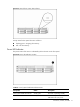
Figure 61 Optical drive activity LED indicator
Activity states for the optical drive are as follows:
• Flashing green – Ongoing drive activity
• Off – No drive activity
Power LED Indicator
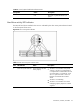
The power status of the server is indicated by the bicolor LED on the front panel.
Figure 62 Power LED Indicator Location
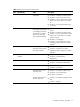
Table 6 Power/system health LED indicator status
Component Status Description
Power/system health LED indicator Steady green The server is operating normally.
Steady Amber The server is system off or in
hibernation with A/C power.