
ProLiant DL180 Server Maintenance and Service Guide

Removal and Replacement Procedures 39
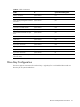
Item Description
1 1
st
SAS/SATA Hard Drive
2 2
nd
SAS/SATA Hard Drive
3 3
rd
SAS/SATA Hard Drive
4 4
th
SAS/SATA Hard Drive
5 5
th
SAS/SATA Hard Drive
6 6
th
SAS/SATA Hard Drive
7 7
th
SAS/SATA Hard Drive
8 8
th
SAS/SATA Hard Drive
To install a hard drive:
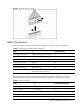
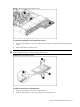
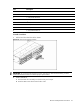
1. Pull the hard drive shield out of the chassis.
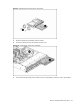
Figure 15
Removing the Hard Drive Blank
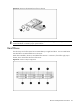
IMPORTANT: Do not discard the hard drive blank. If the drive is removed in the future, you must
reinstall the hard drive blank to maintain proper system airflow.
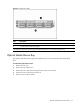
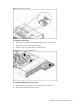
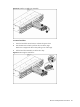
2. Install a hard drive.
a. Push the hard drive assembly into the drive bay until it stops.
b. Press the HDD carrier latch inward until it clicks.