
HP ProLiant DL180 Server Software Configuration Guide





Contents 49
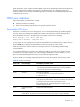
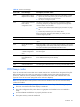
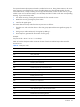
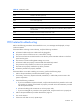
Table 27 Checkpoint codes
C6h Initialize note dock (optional)
C7h Initialize note dock late
C8h Force check (optional)
C9h Extended checksum (optional)
CAh Redirect Int 15h to enable remote keyboard
CBh Redirect Int 13h to memory technologies devices such as ROM, RAM, PCMCIA,
and serial disk
CCh Redirect Int 10h to enable remote serial video
CDh Re-map I/O and memory for PCMCIA
CEh Initialize digitizer and display message
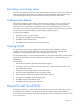
POST-related troubleshooting
Perform the following procedures when POST fails to run, error messages are displayed, or beep
codes are emitted.
If the POST failure is during a routine bootup, verify the following conditions:
• All external cables and power cables are firmly plugged in.
• The power outlet to which the server is connected is working.
• The server and monitor are both turned on. The bicolor power status LED indicator on the front
panel must be green.
• The monitor's contrast and brightness settings are correct.
• All internal cables are properly connected and all boards firmly seated.
• The processor is fully seated in its socket on the system board.
• The heat sink is properly installed on top of the processor.
• All memory modules are properly installed.
If the POST failure occurs after installing an accessory, perform the following steps:
1. Perform the pre-installation procedure described on page 73.
2. If necessary, remove any expansion boards, assemblies, or cables that prevent access to the
system components.
3. Check the following conditions:
a. If you have installed an expansion board, verify that the board is firmly seated in its slot and
any switches or jumpers on the board are properly set. Refer to the documentation provided
with the expansion board.
b. All internal cabling and connections are in their proper order.
c. If you have changed any switches on the system board, verify that each one is properly set.
4. Perform the post-installation procedure described on page 73.
5. Turn on the monitor.
6. If the server still does not work, repeat step 2.