
HP ProLiant DL180 Server Software Configuration Guide




Contents 46
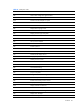
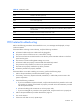
Table 27 Checkpoint codes
48h Check video configuration against CMOS
49h Initialize PCI bus and devices
4Ah Initialize all video adapters in system
4Bh Quiet boot start (optional)
4Ch Shadow video BIOS ROM
4Eh Display BIOS copyright notice
4Fh Initialize multi-boot
50h Display processor type and speed
51h Initialize EISA board
52h Test keyboard
54h Set key click if enabled
55h Enable USB devices
56h Enable keyboard
57h Enable FireWire devices
58h 2-2-3-1 Test for unexpected interrupts
59h Initialize POST display service
5Ah Display prompt ”Press F10 to enter SETUP”
5Bh Disable processor cache
5Ch Test RAM between 512 and 640 KB
5Eh Test base memory
60h Test extended memory
62h Test extended memory address lines
64h Jump to user patch 1
66h Configure advanced cache registers
67h Initialize multiprocessor APIC
68h Enable external and processor caches
69h Setup System Management Mode (SMM) area
6Ah Display external L2 cache size
6Bh Load custom defaults (optional)
6Ch Display shadow-area message
70h Display error messages
72h Check for configuration errors