
HP ProLiant DL180 Server Software Configuration Guide

Contents 40
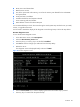
• BIOS version and release date
• BMC firmware version
• Size of the system and video memory, as well as the memory size allotted for the cache RAM
and option ROM
• Serial port base I/O address
• Available hard drives and expansion boards
• Server asset tag and serial number
• MAC address of each of the three LAN ports
It is recommended that you check this screen during the initial system setup and each time you install,
remove, or upgrade accessories.
You first need to enable the display of the diagnostic screen during bootup. Follow the steps below.
Boot-time diagnostic screen
To view the boot-time diagnostic screen
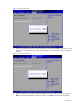
1. In the Main menu screen, select Boot Options.
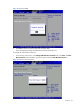
2. Select the Boot Summary Screen field.
3. Press the plus (+) or minus (-) key to set the field to Enabled.
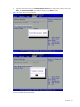
4. Press F10 to save the changes you made and close the Setup Utility.
5. Reboot the server.
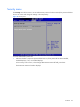
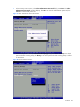
The diagnostic screen is displayed briefly at the end of POST.
Figure 40 Boot-time diagnostic screen
6. Press the Pause/Break key to continue displaying the screen until another key is pressed.
7. Press any key to continue with the system bootup.