
HP ProLiant DL2000 server technologies

Fans and fan control
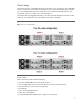
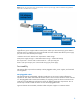
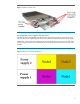
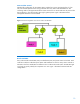
Standard fan configuration for the e2000 chassis includes four, 80-mm non-hot-plug fans. If a fan
fails, the DL2000 implements fan zoning and takes down only those nodes behind the fan. The
remaining nodes on the opposite side of the chassis continue to run. Each node sees only the two fans
that are directly in front of that node, allowing for greater uptime. Figure 6 illustrates thermal
management architecture in the DL2000.
Figure 6. T
hermal management across server nodes in the DL2000
Bezels and LEDs
Every node inc
ludes a health LED, UID (unit identification) LED, and power button on the back. Each
node also includes an individual power button and health LED on the front. Every chassis includes a
UID LED on the front. Health LEDs use different colors to indicate the node’s status. HP UID LEDs light
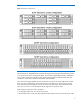
up to help you quickly identify the components in a rack. Figure 7 illustrates front bezel and LED
configurations.
10