
HP ProLiant DL165 G7 Server Software Configuration Guide

System BIOS configuration 38
Power-On Self Test (POST)
When the server boots up, a series of tests are displayed on the screen. This is referred to as Power-
On Self-Test (POST). POST is a series of diagnostic tests that checks firmware and assemblies to
ensure that the server is properly functioning. This diagnostic function automatically runs each time the
server is powered on.
These diagnostics, which reside in the BIOS ROM, isolate the server-related logic failures and indicate
the board or component that needs to be replaced, as indicated by the error messages. Most server
hardware failures are accurately isolated during POST. The number of tests displayed depends on the
configuration of the server.
During POST you can:
• Press ESC to skip the HP logo and go to POST boot progress display system summary screen.
• Press F10 to access the Setup Utility.
• Press F12 to request a network boot (PXE).
• Press F1 to continue POST after POST errors are detected.
POST error indicators
When POST detects a system failure it displays a POST error message.
Recoverable POST Errors
When a non-fatal error occurs during POST, the screen will display an error message with the format
“xxx-Error Identifier String” where “xxx” is a unique number code that matches ODM system specific
error documentation and may be a hexadecimal or decimal value.
All Error messages describe the problems as shown below:
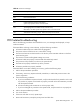
Table 26 POST Error Messages
Error code Description
601 Error: BMC Not Responding
605 BMC Has Detected Fatal Hardware Error
611 Internal User Area Of BMC FRU Corrupted
612 Controller Update 'boot block' Firmware Corrupted
613 Controller Operational Firmware Corrupted
624 Power Supply Failure or Power Supply Unplugged
622 Either Fan Failure or Fan Missing
194 CPUID, Processor family are different
192 L3 cache size mismatch
197 Processor speeds mismatched
005 CMOS Checksum Bad
041 Display memory test failed