
HP ProLiant DL165 G7 Server Installation Sheet

Installing the SD card reader
module
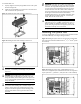
To install the SD card reader module:
1. Remove the SD card reader module knock-out from the back
panel of the server.
2. Align the SD card reader module to the back panel, and tighten
the screw that secures the module to the chassis.
3. Connect the USB cable to the SD card reader module USB
connector and link the other side of the USB cable connector to
the system board. (Refer to your system hood label for the
connector locations.)
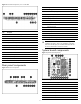
Figure 15 Installing the SD card reader Module
NOTE: You must use the slotted driver to remove the
knock-out.
Installing the dedicated
management port card
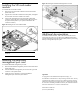
To install the dedicated management port card:
1. Remove the dedicated management port knock-out from the back
panel of the server.
2. Insert the dedicated management port card into the mgmt card
connector on the system board.
3. Tighten the screw clockwise to secure the dedicated
management port card to the system board.
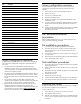
Figure 16 Installing the Dedicated Management Port Card
Additional documentation
For additional documentation, refer to the HP ProLiant DL165 G7
Server Easy Set-up CD. You can also access additional information
and documentation from the HP external website, either by connecting
directly or through the Easy Set-up CD.
Legal notices
© Copyright 2010 Hewlett-Packard Development Company, L.P.
The information contained herein is subject to change without notice. The only
warranties for HP products and services are set forth in the express warranty
statements accompanying such products and services. Nothing herein should
be construed as constituting an additional warranty. HP shall not be liable for
technical or editorial errors or omissions contained herein.
Part Number 601464-003
June 2010 (Third Edition)