
HP ProLiant DL165 G7 Server Installation Sheet


6
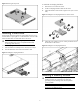
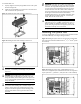
To install the memory module:
1. Align the notch on the bottom edge of the memory module with
the keyed surface of the DIMM slot and then fully press the
memory module into the slot until the holding clips snap back in
place.
Figure 9 Installing the Memory Module
CAUTION: DIMM slots are structured to ensure proper
installation. If you insert a DIMM but it does not fit easily
into the slot, you may have inserted it incorrectly. Reverse
the orientation of the DIMM and insert it again.
Installing a processor
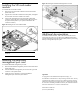
To install the processor:
1. For AMD processor with installation tool, use the processor
installation tool to insert the processor into the socket, using the
keys on the processor.
2. Remove the processor installation tool.
3. Engage the retention plate and the load lever.
Figure 10 Installing the Processor
For processor removal, reverse the above installation procedures.
CAUTION: With the load lever and the retention plate
disengaged, hold the processor by its edges and align it
over the empty processor socket. Make sure that you
properly align the processor with the orientation notch on
the socket.
CAUTION: To prevent overheating or a possible system
crash, use only a heat sink model specified for the HP
ProLiant DL165 G7 Server.
CAUTION: Align pin 1 on the processor with pin 1 on the
processor socket, or pin damage will occur.
CAUTION: HP recommends using Shin-Etsu X-23-7783D
thermal grease compound for your ProLiant server. Apply
the grease to the top of the processor in either a 5 “Dot” or
“S” shaped pattern. Ensure even distribution.
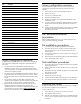
Memory Module Population Order
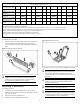
Processor memory socket 1 2 3 4 5 6 7 8 9 10 11 12
Rank support per memory
socket
SR/DR SR/DR/QR SR/DR SR/DR SR/DR/QR SR/DR SR/DR SR/DR/QR SR/DR SR/DR SR/DR/QR SR/DR
RDIMM Population order
without QR
A I E C K G B J F D L H
UDIMM Population order
without QR
A E C G B F D H
Population order with QR
along with SR/DR
E A I G C K F B J H D L
Processor memory bank
number
1 3 2 1 3 2 1 3 2 1 3 2
NOTES:
SR = Single Rank, DR = Dual Rank, QR = Quad Rank.
Population rules must be followed for both processors. DIMMs must be populated in alphabetic order (A, B, C…) as indicated in the matrix.
Memory modules may be populated one at a time per processor, but populating two at a time per processor provides better performance.
Memory modules should be populated four at a time per processor for best performance.
Memory modules within a memory bank must be identical for best performance.
Quad Rank memory module can only be installed in memory sockets 2, 5, 8, and 11.