
HP ProLiant DL165 G7 Server Installation Sheet

5
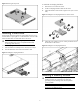
Figure 5 Removing the Top Cover
Installing a hard drive
The drive bays on the front panel can accommodate up to four 3.5 in.
LFF hard drives or up to eight 2.5 in. SFF hard drives. You can install
either SAS hard drives or SATA hard drives in the server.
CAUTION: Drives can be damaged by static electricity.
Before handling drives, touch an unpainted metal surface
to discharge static electricity.
To install the hot-plug hard drive:
1. Push the hard drive assembly into the drive bay until it stops.
2. Press the hard drive carrier latch inward until it clicks.
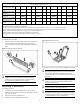
Figure 6 Installing the Hot-plug Hard Drive
To install the non-hot-plug hard drive:
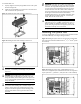
1. Remove the 5 screws from the carrier.
2. Put the non-hot-plug hard drive disk into the carrier.
3. Fasten the hard drive to the carrier using the screws (two on each
side).
Figure 7 Installing the Non-hot-plug Hard Drive into the Carrier
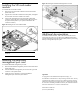
4. Fasten the screw with the T-10/T-15 wrench provided to secure
the hard drive to the chassis.
Figure 8 Installing the Non-hot-plug Hard Drive
Installing a memory module
CAUTION: DIMMs can be damaged by improper
handling. Always use an anti-static wrist strap and
grounding mat, and discharge static electricity before
touching DIMMs.
NOTE: Refer to “System board components” in this
document for the DIMM locations.