
HP ProLiant DL165 G7 Server Installation Sheet
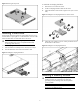
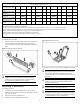
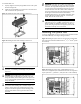

4
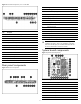
Item Description
9 4-pin power connector
10 24-pin power connector
11 Fan connector 1
12 Fan connector 2
13 DIMM slot 1 for processor 2
14 Backplane I
2
C connector
15 8-pin power connector
16 Fan connectors 3/4
17 Fan connector 5
18 Internal USB 2.0 port
19 SD card USB 2.0 port
20 Front panel USB 2.0 port
21 SAS LED connector
22 Fan connectors 6/7
23 Mini-SAS connector for SATA
24 Power backplane control connector
25 Front panel header
26 TPM connector
27 PCIe x4 slot
28 ODD 2 SATA connector
29 ODD 1 SATA connector
30 3 V CMOS battery (CR2032)
31 NMI jumper
Server configuration resources
In addition to this Installation Sheet, other resources are available for
more information regarding the configuration and maintenance of
your server:
• For safety information and detailed procedures relating to
installation of options, refer to any installation instructions that
came with the option, as well as the HP ProLiant DL165 G7 Server
Maintenance and Service Guide.
• For safety information and detailed procedures related to the rest
of the steps listed in the “Configuring the Server” section, refer to
the relevant chapter of the HP ProLiant DL100 Series Server User
Guide.
• For information relating to system BIOS configuration and
operating system installation, refer to the relevant section of the HP
ProLiant DL165 G7 Server Software Configuration Guide.
• Refer to the HP ProLiant DL165 G7 Server Easy Set-up CD for
additional information and updates not provided in this
installation sheet. You can also access additional information and
documentation from the HP website at http://www.hp.com/
,
either by connecting directly or through the Easy Set-up CD.
Server configuration overview
The steps listed below give an overview of the necessary setup
procedures for preparing the HP ProLiant DL165 G7 Server for
operation:
1. Connect the AC power cord and peripheral devices.
2. Power on the server.
3. Press “F10” to enter BIOS setup.
4. Note the server BIOS version.
5. Verify the server BIOS version against the latest BIOS version
listed for this server.
6. If you do not have the latest BIOS, update the BIOS now. Refer to
the HP ProLiant DL165 G7 Server Maintenance and Service
Guide.
7. Install a supported operating system of your choice. For detailed
procedures, refer to the documentation provided by the
operating system vendor.
Pre- and post-installation
procedures
When installing additional options in your HP ProLiant DL165 G7
Server, observe the following procedures:
Pre-installation procedures
1. Turn off the server and all the peripherals connected to it.
2. Disconnect the AC power cord from the power supply cable
socket located on the server rear panel to reduce the risk of
electrical shock.
3. If the server is installed in a rack, remove the server and place it
on a flat surface.
4. Remove the top cover by following the procedure described later
in the “Opening the server” section.
Post-installation procedures
1. Be sure all components are installed according to the described
step-by-step instructions.
2. Check to make sure you have not left loose tools or parts inside
the server.
3. Reinstall the PCI cage, air baffle, peripherals, and system cables
that you have removed.
4. Reinstall the top cover.
5. Reinstall the server into the rack.
6. Connect all external cables and the AC power cord to the system.
7. Press the power button on the front panel to turn on the server.
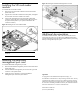
Opening the server
The top cover is removable. You need to remove the top cover before
you can remove or replace a server component.
To remove the top cover:
1. Loosen the screw on the top cover with a T-10 wrench.
2. Press the latch on the top cover.
3. Slide the cover toward the rear of the server and then lift the top
cover to remove it from the chassis. Lift the top cover away from
the chassis.