
HP ProLiant DL165 G6 Server Software Configuration Guide



System BIOS configuration 9
Setup Utility menus
The Setup Utility menu bar displays the five primary menu selections. For detailed information and
screenshots of these Setup menus and their related submenus, refer to the following sections.
Main Menu
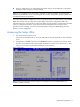
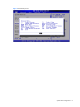
Figure 3 Main Menu
NOTE: The time is in 24-hour format. For example, 5:30 A.M. appears as 05:30:00, and 5:30,
P.M. as 17:30:00. If you clear CMOS, setup time and date values will be 00:00:00 and
02/29/2006.
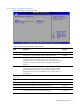
Table 2 Main menu fields
Field
Description
System Overview Displays the system ROM Version, the date when the Setup utility was created and
identification number.
Processor Displays the CPU version, speed and count.
System Memory Displays the amount of conventional memory detected during POST.
Asset Tag Enter the server asset tag.
System Serial
Number
Enter the server serial number. The serial number is indicated on the serial number label
pull tab on the front panel.
System Time Adjusts the system time.
System Date
Adjusts the system date.
Boot Settings
Configuration
Sets which options to run during system boot up. Press Enter to access the related
submenu. For details on the submenu options, see the “Boot Settings Configuration
submenu” section.