
HP ProLiant DL165 G6 Server Software Configuration Guide

NOS installation 38
NOS installation
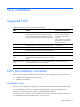
Supported NOS
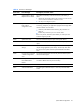
Table 22 Supported network operating systems (NOS)
NOS
Version
On-line information site
Microsoft Windows Microsoft Windows Server 2003—Enterprise,
Standard, and Web Editions Microsoft Windows
Server 2003 R2—Enterprise, Standard, and Web
Editions Microsoft Windows Server 2003 for 64-bit
Microsoft World Wide Web
access: www.microsoft.com
Microsoft Product Support
Services:
http://support.microsoft.com/
directory Microsoft Software
BBS: 206-936-6735
Extended Systems—Enterprise and Standard Editions (14,400 bps)
Microsoft Windows Server 2003 R2 for 64-bit
Extended Systems—Enterprise and Standard Editions
Microsoft Windows Longhorn Beta (beta support)
Red Hat Enterprise
Linux
Red Hat Enterprise Linux 4 (32- and 64-bit)—AS, ES,
and WS versions Red Hat Enterprise Linux 5 (32- and
64-bit)
www.redhat.com
SUSE Linux Enterprise
Server
SUSE Linux Enterprise Server 9 (32- and 64-bit) SUSE
Linux Enterprise Server 10 (32- and 64-bit)
www.novell.com/linux
Sun Solaris Enterprise
Sun Solaris 10 (64-bit) www.sun.com/solaris
NOS pre-installation procedure
Perform the two pre-NOS installation steps in this section before installing the NOS of your choice.
1. Configure the hardware aspect of the server.
2. Update the server BIOS.
Hardware setup
Prepare the server following the instructions in the HP ProLiant DL165 G6 Server Installation Sheet.
It is recommended that you do not install any third party adapter until you verify that the HP
equipment is functioning properly and you complete the NOS installation.
Your ProLiant server comes with new hard disk drive(s) that do not need specific setup. However, if
you install additional used hard disk drives in your new server: