
HP ProLiant DL165 G6 Server Software Configuration Guide

System BIOS configuration 35
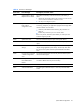
Table 21 POST Error Messages
Error code
Error message
Description/corrective action
0250 System battery is dead -
Replace and run SETUP
The CMOS clock battery indicator shows the system battery is
dead.
1
Replace the system battery following the procedures in the HP ProLiant
DL165 G6 Server Maintenance and Service Guide.
2 Run Setup to reconfigure the system.
0251 System CMOS checksum
bad - Default
configuration used
The settings in the Setup Utility have been corrupted or modified
incorrectly, perhaps by an application program that changes data
stored in CMOS. You can either:
•
Load the system default values following the procedures on
page 33.
•
Access Setup and enter your own custom values.
If the error persists, check the system battery or contact your HP
Customer Support provider.
0260
System timer error
The timer test failed. Requires repair of the system board.
0270 Real time clock error Real-Time Clock (RTC) fails BIOS hardware test. May require board
repair.
0271 Check date and time
settings
BIOS found date or time out of range and reset the RTC. May
require setting legal date (1991-2099). Access Setup and check
the values in the System Timeand System Datefields of the Main
menu.
0280 Previous boot incomplete
– Default configuration
used
Initial bootup failed. BIOS automatically loads the default system
values, then boot again.
0281 Memory size found by
POST differed from
CMOS
The user has added or removed a memory module, thus a memory
size that is different from the previous bootup.
02F5 DMA test failed The DMA control test failed.
02F6 Software NMI failed An NMI signal is detected and/or a user has pressed the NMI
switch.