
HP ProLiant DL165 G6 Server Maintenance and Service Guide

Diagnostic tools and Setup Utilities 85
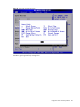
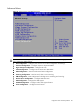
Advanced Menu
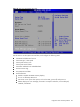
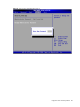
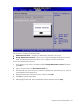
Figure 77 Advanced menu of the BIOS setup utility
WARNING: Incorrect settings may cause the server to malfunction. To correct the settings, press F9
key to restore the default settings.
• CPU Configuration --- Configure and view the current CPU configuration and settings.
• IO Device Configuration --- Configure Super IO chipset SCH4307.
• Hyper Transport Configuration --- Configure HT Links.
• S-ATA Configuration --- Configure Server Works HT 1000 SATA.
• ACPI Configuration --- Section for Advanced ACPI configuration.
• Event Log Configuration --- Mark as read, clear or view event log.
• IPMI Configuration --- IPMI Configuration including server monitoring and event log.
• Remote Access Configuration --- Configure Remote Access.
• USB Configuration --- Configure the USB support.
• PCI BUS Configuration --- Configure video card support function.
• Power Configuration --- Configure Power function.