
HP ProLiant DL165 G6 Server Maintenance and Service Guide



Removal and Replacement Procedures 78
2.
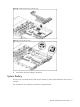
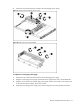
Release the fan cable from the cable clip.
3. Hold the system fan and lift it away from the chassis.
Figure 72 Removing the system fan
To install the system fan:
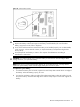
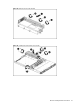
1. Put the fan cable through the system fan bracket and secure the cable using the cable clip on the
chassis.
2. Hold the system fan and press it into the fan bracket.
3. Connect the fan cable to its corresponding board connector.
Figure 73 Installing the system fan