
HP ProLiant DL165 G6 Server Maintenance and Service Guide



Removal and Replacement Procedures 77
System Fan
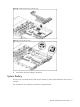
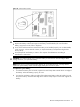
The server has six system fans located on the chassis’ center wall.
The figure below identifies the system fans by their device number and shows their corresponding
cable connections.
Figure 71 System fan connections
Device number Connector
System fan 1 P12 on the system board
System fan 2 P18 on the system board
System fan 3 P13 on the system board
System fan 4 P15 on the system board
System fan 5 P17 on the system board
System fan 6 P19 on the system board
System fans 1 to 5 are for the memory modules and processors, while system fan 6 is for the PCI slots and system
chipsets.
A new system fan can be installed to allow the server to operate properly in case a default system fan
becomes defective.
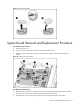
To remove the system fan:
1. Disconnect the fan cable from its corresponding board connector.