
HP ProLiant DL165 G6 Server Maintenance and Service Guide



Removal and Replacement Procedures 75
3.
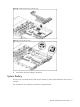
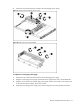
Loosen the screws that secure the bracket to the non-hot-plug power supply.
Figure 67 Removing the non-hot-plug power supply
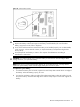
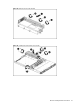
Figure 68 Remove the power supply bracket
To replace the non-hot-plug power supply:
1. Fasten the screws that secure the bracket to the non-hot-plug power supply
2. Align the non-hot-plug power supply with bracket to the right location next to the motherboard.
3. Align the screw holes on the non-hot-plug power supply with the screw holes on the chassis (one
on the top of the power supply, others on the sides).
4. Fasten the non-hot-plug power supply to the chassis using the screws that just been loosened.