
HP ProLiant DL165 G6 Server Maintenance and Service Guide

Removal and Replacement Procedures 51
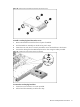
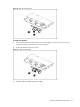
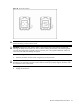
Figure 26 Fastening the non-hot-plug hard drive disk to the carrier
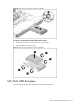
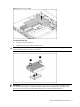
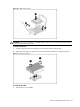
To install a non-hot-plug hard drive in the server:
1. Remove the hard drive blank from front of system if installed.
2. Push the hard drive assembly into the drive bay until it stops.
3. Fasten the screw with the T-15 wrench provided to secure the hard drive to the chassis.
4. Connect the cabling from the HDD backplane to the drive using the cables provided.
Figure 27 Installing the non-hot-plug hard drive assembly
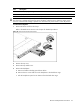
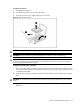
To remove the non-hot-plug hard drive:
1. Loosen the screw with the T-15 wrench provided.
2. Pull the hard drive assembly out of the drive bay.