
HP ProLiant DL165 G6 Server Maintenance and Service Guide




Removal and Replacement Procedures 50
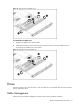
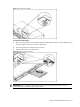
Figure 24 Removing the hot-plug hard drive
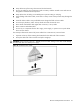
To install a non-hot-plug hard drive:
1. Loosen four screws from the top part of the carrier.
2. Put the non-hot-plug hard drive disk into the carrier.
3. Fasten the HDD to the carrier using the screws (two on each side).
Figure 25 Installing the non-hot-plug hard drive disk into the carrier