
HP ProLiant DL165 G6 Server Maintenance and Service Guide




Removal and Replacement Procedures 48
Hard Drives
The drive bays on the front panel can accommodate up to four hard drives. You can install either SAS
hard drives or SATA hard drives in the server.
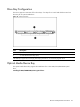
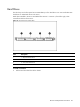
Hard drives installed in the server are labeled from Device 1 to Device 4, from left to right, when
viewed from the front of the server.
Figure 21 Hard drive bays configuration
Item Description
1 1
st
SAS/SATA Hard Drive
2 2
nd
SAS/SATA Hard Drive
3 3
rd
SAS/SATA Hard Drive
4 4
th
SAS/SATA Hard Drive
To install a hard drive:
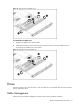
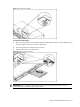
1. Pull the hard drive shield out of the chassis.