
HP ProLiant DL165 G6 Server Maintenance and Service Guide




Removal and Replacement Procedures 47
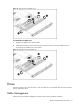
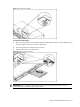
Figure 19
Connecting the cables
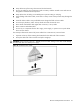
To remove the optical drive:
1. Remove the top middle cover and then unplug the ODD cable and power cable, uplift the spring
latch securing the optical drive carrier to the chassis.
2. Push the optical drive toward the front of the unit.
3. Pull the optical drive out of the chassis.
Figure 20 Removing the optical drive
IMPORTANT: If you removed an optical drive without plans of installing a new one, you must
reinstall the blank to maintain proper system airflow.