
HP ProLiant DL165 G6 Server Maintenance and Service Guide




Removal and Replacement Procedures 45
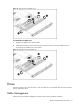
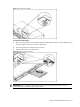
Figure 16
DVD/CDRW-ROM Location
Pre-installation Procedure:
1. Turn off the server and all the peripherals connected to it.
2. Unplug all external cables and AC power cords. If necessary, label each one to expedite
reassembly.
3. Remove unit from rack and place on a flat surface.
4. Remove the top cover.
5. Remove the top middle cover.
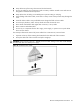
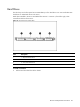
To remove the bezel blank:
1. Pull the bezel blank out of the carrier.
CAUTION: Do not discard the bezel blank. If the optical drive is removed in the future, you must
reinstall the bezel blank to maintain proper system function.