
HP ProLiant Lights-Out 100 Remote Management User Guide for HP ProLiant ML110 G5, ML115 G5, DL120 G5, ML150 G5, DL160 G5, DL165 G5, DL1809 G5, DL185 G5, and SL165z G6 Servers

Using LO100 61
o
DOS: ipmitool 20 c0 29 01 00 00 02 00 08
o Linux: ipmitool raw 0x30 0x29 0x01 0x00 0x00 0x02 0x00 0x08
• To set telnet outbound to 0x03:
o CLP: oemhp I 20 c0 20 18 00 29 01 00 00 02 01 03 b8
o DOS: ipmitool 20 c0 29 01 00 00 02 01 03
o Linux: ipmitool raw 0x30 0x29 0x01 0x00 0x00 0x02 0x01 0x03
• To set SSH inbound to 0x08:
o CLP: oemhp I 20 c0 20 18 00 29 01 00 01 02 00 08 b3
o DOS: ipmitool 20 c0 29 01 00 01 02 00 08
o Linux: ipmitool raw 0x30 0x29 0x01 0x00 0x01 0x02 0x00 0x08
• To set SSH outbound to 0x03:
o CLP: oemhp I 20 c0 20 18 00 29 01 00 01 02 01 03 b7
o DOS: ipmitool 20 c0 29 01 00 01 02 01 03
o Linux: ipmitool raw 0x30 0x29 0x01 0x00 0x01 0x02 0x01 0x03
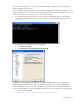
For example, to restore the default setting using telnet in Windows®:
1. Log in to the CLP interface from a Windows® Telnet client.
2. Change the directory to map1 using the command:
cd map1
3. Set input default to 0x08 using the command:
oemhp I 20 c0 20 18 00 29 01 00 00 02 00 08 b4
4. Set output default to 0x03 using the command:
oemhp I 20 c0 20 18 00 29 01 00 00 02 01 03 b8
5. Log out.