
HP ProLiant Lights-Out 100 Remote Management User Guide for HP ProLiant ML110 G5, ML115 G5, DL120 G5, ML150 G5, DL160 G5, DL165 G5, DL1809 G5, DL185 G5, and SL165z G6 Servers


Using LO100 50
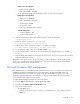
Option User Operator
Virtual KVM No No
Application License Key No No
Security Settings No No
Changing user settings through a web browser
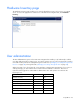
The User Administration screen enables you to view user information, modify user settings, and enable or
disable user accounts. The first user account is a fixed null value. You cannot change the properties of the
first user or use it to log in. Only the first two users (after the fixed null value) are enabled for login by
default. Users can only be enabled from the browser interface.
WARNING: Do not disable all user accounts. If you disable all user accounts you will not be
able to log in to LO100. HP recommends always leaving at least one user with administrative
privileges.
To modify user settings:
1. On the main menu navigation bar, click User Administration.
2. In the Password and Confirm Password fields, enter the password.
3. Select the User Privilege level from the list. For more information on user privileges and access rights,
see "User administration (on page 49)."
4. (Optional) Change the user name.
5. To save the changes, click Set.
Changing user settings through the CLP
The first user is a fixed null value. Customizable users start at user2 and continue through user16. You can
only enable users for log in through the browser. However, you can change the values through any
connection.