
HP ProLiant DL165 G5p Server Software Configuration User Guide






System BIOS configuration 8
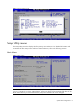
Figure 2 General Help Screen
Setup Utility menus
The Setup Utility menu bar displays the five primary menu selections. For detailed information and
screenshots of these Setup menus and their related submenus, refer to the following sections.
Main Manu
Figure 3 Main Manu
NOTE: The time is in 24-hour format. For example, 5:30 A.M. appears as 05:30:00, and 5:30,
P.M. as 17:30:00. If you clear CMOS battery, setup time values will be 00:00:00 and date will be
BIOS release date. If you clear CMOS button, setup time and date will not be changed.