
HP ProLiant DL165 G5p Server Software Configuration User Guide


System BIOS configuration 33
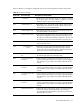
Table 19 POST Error Messages
Error code Error message Description/corrective action
052
Master Slave Disk Error The IDE/ATAPI device configured as Slave in the 3rd IDE controller
could not be properly initialized by the BIOS. This message is
typically displayed when the BIOS is trying to detect and configure
IDE/ATAPI devices in POST.
05E
Password check failed If user input incorrect password more than three times, then display
this error information and continue to boot.
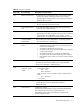
Uncorrectable memory
error
System halts after displaying this message. If the problem persists,
contact Foxconn Customer Support.
Microcode Error BIOS could not find or load the CPU Microcode Update to the CPU.
The message is most likely to appear when a new CPU is installed in
a system board with outdated BIOS. In this situation, you must
update the BIOS to include the Microcode Update for the new CPU.
Checking NVRAM
Update Failed
BIOS could not write to the NVRAM block. This message appears
when the FLASH part is malfunctioning.
Operating system not
found
Operating system cannot be located on any of the boot drives.
Verify that the priority boot drive has power and that the IDE
cable is connected properly.
Verify that the desired boot drive has power
Verify that the IDE cable is securely plugged into the respective
system board connectors.
Verify that the boot device is enabled in the Setup Utility.
Verify that the boot device has an operating system installed.
If the problem persists, contact your Foxconn Customer Support
provider.
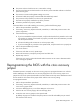
0200 Failure Fixed Disk Fixed disk is not working or not configured properly.
Run Setup and check if the fixed-disk type is correctly identified.
Check to see if fixed disk is attached properly.
0202
CPU mismatch detected!
Fatal Error…System
Halted.
The Error Message will be display when install two CPU on
motherboard as follow:
Slot I : NPT
Slot II : Barcelona
Note: The server can’t boot if install two CPU on motherboard as
follow:
Slot I : Barcelona
Slot II :NPT
0210 Stuck key Stuck key on keyboard.
1 Locate the stuck key on your keyboard and release it.
2 Reboot the server.
0211 Keyboard error Keyboard not working.
Verify that the keyboard cable is securely connected to the keyboard
port (not the mouse port) on the rear panel of the server.
If the problem persists, replace the keyboard or contact your HP
Customer Support provider.