
HP ProLiant DL165 G5p Server Software Configuration User Guide


System BIOS configuration 32
When no POST error message is displayed but the server stops during POST, listen for beep codes.
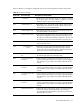
Table 19 POST Error Messages
Error code Error message Description/corrective action
000 Timer Error Indicates an error while programming the count register of channel 2
of the 8254 timer. This may indicate a problem with system
hardware. Requires repair of the system board.
003 CMOS Battery Low CMOS Battery is low. This message usually indicates that the CMOS
battery needs to be replaced. It could also appear when the users
intentionally discharge the CMOS battery.
004 CMOS setting Wrong CMOS settings are invalid. This error can be resolved by using F9 to
load optimal default in the Setup Utility.
005 CMOS Checksum Bad CMOS contents failed the Checksum check. Indicates that the CMOS
data has been changed by a program other than the BIOS or that
the CMOS is not retaining its data due to malfunction. This error can
be resolved by using F9 to load optimal default in the Setup Utility.
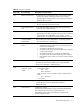
008 Unlock keyboard PS2 keyboard is locked. Users need to unlock the keyboard to
continue the BIOS POST.
009 PS2 Keyboard not
found
Keyboard not working. Verify that the keyboard cable is securely
connected to the keyboard port (not the mouse port) on the rear
panel of the server. If the problem persists, replace the keyboard or
contact your Foxconn Customer Support provider.
018 CMOS Date/Time not
Set
The CMOS Date and/or Time are invalid. This error can be resolved
by readjusting the system time in the Setup Utility.
04D Primary Master Hard
Disk Error
The IDE/ATAPI device configured as Primary Master could not be
properly initialized by the BIOS. This message is typically displayed
when the BIOS is trying to detect and configure IDE/ATAPI devices
in POST
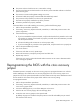
04E Primary Slave Hard
Disk Error
The IDE/ATAPI device configured as Primary Slave could not be
properly initialized by the BIOS. This message is typically displayed
when the BIOS is trying to detect and configure IDE/ATAPI devices
in POST.
04F Secondary Master Hard
Disk Error
The IDE/ATAPI device configured as Secondary Master could not be
properly initialized by the BIOS. This message is typically displayed
when the BIOS is trying to detect and configure IDE/ATAPI devices
in POST.
050 Secondary Slave Hard
Disk Error
The IDE/ATAPI device configured as Secondary Slave could not be
properly initialized by the BIOS. This message is typically displayed
when the BIOS is trying to detect and configure IDE/ATAPI devices
in POST.
051 Master Hard Disk Error The IDE/ATAPI device configured as Master in the 3rd IDE controller
could not be properly initialized by the BIOS. This message is
typically displayed when the BIOS is trying to detect and configure
IDE/ATAPI devices in POST.