
HP ProLiant DL165 G5p Server Software Configuration User Guide

System BIOS configuration 31
The clear CMOS setting is on clear CMOS button (SW4) on the system board. Refer to the HP
ProLiant DL165G5p Server Maintenance and Service Guide for the location of this jumper block and
the clear CMOS setting.
To clear CMOS:
1. Perform the pre-installation procedures.
2. If necessary, remove any expansion boards, assemblies, or cables that prevent access to the
press CMOS button (SW4).
3. Locate the clear CMOS button (SW4) on the system board.
4. Press clear CMOS button (SW4) to clear the CMOS memory.
5. Perform the post-installation procedures.
6. During POST, press F10 to access the Setup Utility.
7. Press F9 to load the system default values.
8. Press F10 to save the changes you made and close the Setup Utility.
Power-On Self Test (POST)
When the server boots up, a series of tests are displayed on the screen. This is referred to as Power-
On Self-Test (POST). POST is a series of diagnostic tests that checks firmware and assemblies to
ensure that the server is properly functioning. This diagnostic function automatically runs each time the
server is powered on.
These diagnostics, which reside in the BIOS ROM, isolate server-related logic failures and indicate the
board or component that needs to be replaced, as indicated by the error messages. Most server
hardware failures are accurately isolated during POST. The number of tests displayed depends on the
configuration of the server.
POST error indicators
When POST detects a system failure, it either:
• Displays a POST error message
• Emits a series of beep codes (requires an optional expansion board)
Recoverable POST Errors
Whenever a non-fatal error occurs during POST, an error message describing the problem appears
onscreen. These text messages are displayed in normal video (white text on black background). It
shows the details of the error. The following is an example of a POST error message:
Error message 1 of 1: Error code 0103
Keyboard not detected - Keyboard error
In some cases an error message may include recommendations for troubleshooting or require that you
press the Enter key to display recommendations. Follow the instructions on the screen.
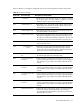
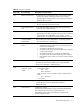
Table 20 lists the most common POST error messages with their corresponding troubleshooting
recommendation.
It is recommended that you correct the error before proceeding, even if the server appears to boot
successfully. If your system displays one of the messages marked below with an asterisk (*), write
down the code and message and contact your HP Customer Support provider.