
HP ProLiant DL165 G5p Server Maintenance and Service Guide

Contents 91
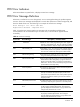
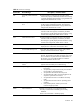
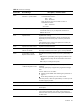
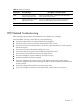
Table 12 POST Error Message
Error-Code Error Message Description / Corrective Action
0280 Previous boot incomplete –
Default configuration used
Initial boot up failed. BIOS automatically loads the default
system values, then boot again.
0281 Memory size found by POST
differed from CMOS
The user has added or removed a memory module, thus a
memory size that is different from the previous boot up.
02F5 DMA test failed The DMA control test failed.
POST Related Troubleshooting
Perform the following procedures when POST fails to run, displays error messages.
If the POST failure is during a routine boot up, check the following:
• All external cables and power cables should be firmly plugged in.
• The power outlet to the server should be connected and works correctly.
• The server and monitor are both turned on. The bicolour status LED indicator on the front panel
must be lit up green.
• The monitor's contrast and brightness settings are correct.
• All internal cables are properly connected and all boards firmly seated.
• The processor is fully seated in its socket on the system board.
• The cooler assembly is properly installed on top of the processor.
• All memory modules are properly installed.
• If you have installed a PCI accessory board, verify that the board is firmly seated and any
switches or jumpers on the board are properly set. Refer to the documentation provided with the
accessory board.
• All internal cabling and connections are in their proper order.
• If you have changed any switches on the system board, verify that each is properly set.