
HP ProLiant DL165 G5p Server Maintenance and Service Guide


Contents 88
POST Error Indicators
When POST detects a system failure, it displays a POST error message.
POST Error Message Definition
Whenever a non-fatal error occurs during POST, an error message describing the problem appears
onscreen. These error messages are displayed in normal video (white text on black background), and
show the details of the error. The following is an example of a POST error message:
Error message 1 of 1: Error code 0103
Keyboard not detected - Keyboard error
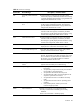
Table 12 lists the most common POST error messages with corresponding troubleshooting
recommendation. HP recommends that you correct the error, even if the server appears to boot
successfully.
Table 12
POST Error Message
Error-Code Error Message Description / Corrective Action
000 Timer Error Indicates an error while programming the count register of
channel 2 of the 8254 timer. This may indicate a problem
with system hardware. Requires repair of the system board.
003 CMOS Battery Low CMOS Battery is low. This message usually indicates that the
CMOS battery needs to be replaced. It could also appear
when the users intentionally discharge the CMOS battery.
004 CMOS setting Wrong CMOS settings are invalid. This error can be resolved by
using F9 to load optimal default in the Setup Utility.
005 CMOS Checksum Bad CMOS contents failed the Checksum check. Indicates that the
CMOS data has been changed by a program other than
the BIOS or that the CMOS is not retaining its data due to
malfunction. This error can be resolved by using F9 to load
optimal default in the Setup Utility.
008 Unlock keyboard PS2 keyboard is locked. Users need to unlock the keyboard
to continue the BIOS POST.
009 PS2 Keyboard not found Keyboard not working. Verify that the keyboard cable is
securely connected to the keyboard port (not the mouse
port) on the rear panel of the server. If the problem persists,
replace the keyboard or contact your Foxconn Customer
Support provider.
018 CMOS Date/Time not Set The CMOS Date and/or Time are invalid. This error can be
resolved by readjusting the system time in the Setup Utility.
04D Primary Master Hard Disk
Error
The IDE/ATAPI device configured as Primary Master could
not be properly initialized by the BIOS. This message is
typically displayed when the BIOS is trying to detect and
configure IDE/ATAPI devices in POST
04E Primary Slave Hard Disk Error The IDE/ATAPI device configured as Primary Slave could not
be properly initialized by the BIOS. This message is
typically displayed when the BIOS is trying to detect and
configure IDE/ATAPI devices in POST.