
HP ProLiant DL165 G5p Server Maintenance and Service Guide


Contents 73
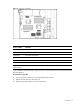
Figure 61 System fan connections
Device number Connector
System fan 1 P12 on the system board
System fan 2 P18 on the system board
System fan 3 P13 on the system board
System fan 4 P15 on the system board
System fan 5 P17 on the system board
System fan 6 P19 on the system board
System fans 1 to 5 are for the memory modules and processors, while system fan 6 is for the PCI slots and
system chipsets.
A new system fan can be installed to allow the server to operate properly in case a default system fan
becomes defective.
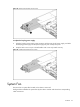
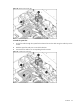
To remove the system fan:
1. Disconnect the fan cable from its corresponding board connector.
2. Release the fan cable from the cable clip.
3. Hold the system fan and lift it away from the chassis.