
HP ProLiant DL165 G5p Server Maintenance and Service Guide


Contents 49
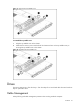
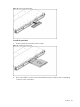
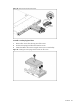
Figure 21
Removing the hot-plug hard drive blank
IMPORTANT: Do not discard the hard drive blank. If the drive is removed in the future, you must
reinstall the hard drive blank to maintain proper system airflow.
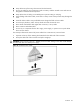
2. Install a hard drive.
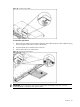
a. Push the hard drive assembly into the drive bay until it stops.
b. Press the HDD carrier latch inward until it clicks.
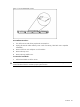
Figure 22 Installing the hot-plug hard drive assembly
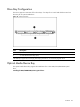
To remove hard drive:
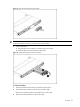
1. Press the hard disk carrier button to release the ejector lever.
2. Use the HDD carrier latch to pull the drive out of the cage.
Make sure to support the drive when pulling it out of the cage.
3. Pull the hard drive assembly out of the drive bay.