
HP ProLiant DL160se G6 Server Software Configuration Guide


System BIOS configuration 33
Security menu
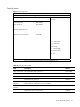
Figure 17 Security menu
ROM-based Setup Utility
Main Advanced Boot <Security> Exit
Security Settings
Install or Change the
Password.
Admin Password: Not Installed
User Password: Not Installed
Change Admin Password
Boot Sector Virus Protection: [Disabled]
←→ Select Screen
↑↓ Select Item
Enter Change
F1 General Help
F10 Save and Exit
ESC Exit
V02. 61 (C) Copyright 1985-2006, American Megatrends, Inc.
Table 18 Security menu fields
Field Description Options
Admin Password Is Not installed the Admin password. Not Installed
Installed the Admin password. Installed
User Password Is Not installed the user password. Not Installed
Installed the user password. Installed
Change Admin
Password
Type the Supervisor's password in the dialogue box to set or to change
Admin password, which allows access to the BIOS.
Boot Sector Virus
Protection
Enable boot sector virus protection. Enabled
Disable boot sector virus protection. Disabled