
HP ProLiant DL160se G6 Server Software Configuration Guide


System BIOS configuration 32
Hard Disk Drives submenu
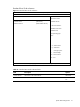
Figure 16 Hard Disk Drives submenu
ROM-based Setup Utility
<Boot>
Hard Disk Drives
Specifies the boot
sequence from the
1st Drive [USB: SanDisk USB F1] available devices.
←→ Select Screen
↑↓ Select Item
+ - Change Option
F1 General Help
F10 Save and Exit
ESC Exit
V02. 61 (C) Copyright 1985-2006, American Megatrends, Inc.
Table 17 Hard Disk Drives submenu fields
Field Description Options
1st Drive USB disk is the 1st drive. USB: SanDisk
USB F1