
HP ProLiant DL160se G6 Server Software Configuration Guide


System BIOS configuration 29
Boot Settings Configuration submenu
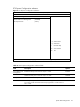
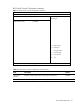
Figure 14 Boot Setting Configuration submenu
ROM-based Setup Utility
<Boot>
Boot Settings Configuration
Allows BIOS to skip
certain tests while
Quick Boot [Enabled] booting. This will
Quiet Boot [Enabled] decrease the time
Num Lock [Enabled] needed to boot the
system.
←→ Select Screen
↑↓ Select Item
+ - Change Option
F1 General Help
F10 Save and Exit
ESC Exit
V02. 61 (C) Copyright 1985-2006, American Megatrends, Inc.
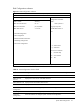
Table 15 Boot Settings Configuration submenu fields
Field Description Options
Quick Boot Allow BIOS to skip certain tests while booting. This will decrease the time
needed to boot the system.
Enabled
Allow the BIOS to process the normal tests while booting. Disabled
Quiet Boot Display OEM Logo instead of POST messages Enabled
Display normal POST messages. This is the default setting. Disabled
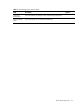
Num Lock Set this value to allow Num Lock on the keyboard to be enabled
automatically when the computer system is booted up. This allows the
immediate use of the numeric keypad located on the right side of the
keyboard. To confirm this, the Num Lock LED on the keyboard will be lit.
Enabled