
HP ProLiant DL160se G6 Server Software Configuration Guide

System BIOS configuration 18
USB Configuration submenu
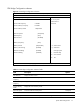
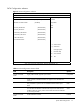
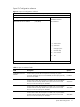
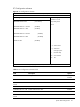
Figure 7 USB Configuration submenu
ROM-based Setup Utility
<Advanced>
USB Configuration
Options
Module Version – 2.24.3-13.4 Disabled
Enabled
USB Devices Enabled:
2 Keyboards, 2 Mouse, 1 Drive
USB Functions [Enabled]
Legacy USB Support [Enabled]
USB 2.0 Controller [Enabled]
USB 2.0 Controller Mode [HiSpeed]
BIOS EHCI Hand-Off [Enabled]
Hot-plug USB FDD Support [Auto]
←→ Select Screen
↑↓ Select Item
> USB Mass Storage Device Configuration + - Change Option
F1 General Help
F10 Save and Exit
ESC Exit
V02. 61(C) Copyright 1985-2006, American Megatrends, Inc.
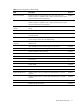
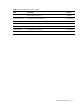
Table 8 USB Configuration submenu fields
Field Description Options
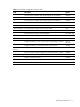
Module Version Display USB module version.
USB Devices Enabled Display the enabled USB devices in system.
USB Functions Enable USB functions. Enabled
Disable USB functions. Disabled
Legacy USB Support: Enable support for Legacy USB devices. Enabled
Disable support for Legacy USB devices. Disabled
USB 2.0 Controller: Enable support USB 2.0. Enabled
Disable support USB 2.0. Disabled
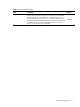
USB 2.0 Controller Mode: Set the USB 2.0 Controller to full-speed. FullSpeed
Set the USB 2.0 Controller to high-speed. HiSpeed