
HP ProLiant DL160se G6 Server Software Configuration Guide

System BIOS configuration 14
SATA Configuration submenu
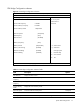
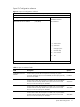
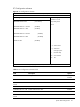
Figure 5 SATA Configuration submenu
ROM-based Setup Utility
<Advanced>
SATA Configuration
Options
SATA#1 Controller Mode [Compatible]
Disabled
SATA#2 Controller Mode [Enabled] Compatible
RAID
>Primary IDE Master: [Not Detected] AHCI
>Primary IDE Slave: [Not Detected]
>Secondary IDE Master: [Not Detected]
>Secondary IDE Slave: [Not Detected]
>Third IDE Master: [Not Detected]
>Fourth IDE Master: [Not Detected]
←→ Select Screen
↑↓ Select Item
+ - Change Option
F1 General Help
F10 Save and Exit
ESC Exit
V02. 61(C) Copyright 1985-2006, American Megatrends, Inc.
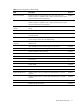
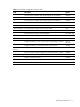
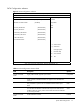
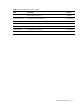
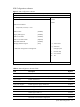
Table 6
SATA Configuration submenu fields
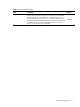
Field Description Options
SATA#1 Controller
Mode
Legacy Native mode, supports up to 4 drives.
Compatible
SATA controller is disabled and does not appear in the standard boot
order list.
Disabled
Only available on systems with an embedded software RAID option
ROM.
RAID
This should be the DEFAULT if NCQ Mode requires that AHCI also be
enabled. Otherwise, legacy SATA Native Mode should be the DEFAULT
as previously specified.
AHCI
SATA#2 Controller
Mode
Enable SATA#2 Controller.
Enabled