
HP ProLiant DL160 Generation 5 Server Software Configuration Guide




System BIOS configuration 14
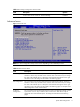
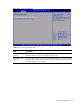
IDE Configuration submenu
Figure 7 IDE Configuration submenu
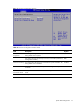
Table 6
IDE Configuration submenu fields
Field Description Options
ATA/IDE Configuration
Set this value to support compatible mode. The setting default value
is Enhanced.
Enhanced
Set this value to prevent the computer system from using IDE and
SATA Device.
Disabled
Set this mode to support compatible mode. Compatible
Configure SATA as Set this value to configure SATA as IDE mode. The setting default
value is IDE.
IDE
Set this value to configure SATA as RAID mode. RAID
Legacy IDE Channels Set this value to support only SATA Device. SATA Only
Set this value to support PATA as primary device and select SATA as
secondary Device.
Note: This mode supports only SATA port2, SATA port 4, and IDE
Device.
PATA Pri.
SATA Sec.
Set this value to support SATA as primary device and select PATA as
secondary Device.
Note: This mode supports only SATA port1, SATA port 3, and IDE
Device.
SATA Pri.
PATA Sec
Set this value to support only PATA Device. PATA Only