
HP ProLiant DL160 Generation 5 Server Maintenance and Service Guide

Diagnostic tools and setup utilities 83
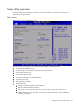
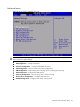
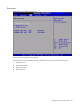
Advanced menu
Figure 73 Advanced menu of the BIOS setup utility
WARNING: Incorrect settings may cause the server to malfunction. To correct the settings, press F9
key to restore the default settings.
• CPU Configuration --- Configure and view the current CPU configuration and settings.
• IDE Configuration --- Configure ATA/IDE.
• IO Device Configuration --- Configure Embedded Serial port.
• ACPI Configuration --- Section for Advanced ACPI configuration.
• IPMI Configuration --- IPMI Configuration including server monitoring and event log.
• USB Configuration --- Configure the USB support.
• Event Log Configuration --- Mark as read, clear or View Event Log.
• Remote Access Configuration --- Configure Remote Access.
• PCI BUS Configuration ---Configure PCIe device working mode.