
HP ProLiant DL160 Generation 5 Server Maintenance and Service Guide


Connectors, Switches, and LEDs 35
Rear panel LED indicators
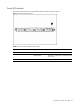
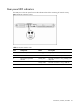
The LAN port on the rear panel has two LED indicators that allow monitoring of network activity.
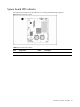
Figure 7 LAN/LED indicators location
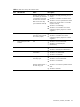
Table 7
LAN/LED indicator states
Item Component Status Description
1 LAN activity status LED indicator Flashing green Ongoing network data activity.
Off No network data activity or no connection.
2 LAN network speed LED
indicator
Steady green The LAN connection is using 10Mbps/100
Mbps link.
Steady amber The LAN connection is using a GbE link.
Off No connection.