
ProLiant DL145 Server User Guide


Hardware Options Installation
HP ProLiant DL145 Server User Guide 4-5
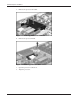
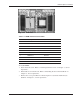
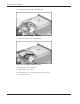
Figure 4-6: DIMM slots
Table 4-1: DIMM and Processor locations
Item Description Bank
1 DIMM slot 4 Bank 1B
2 DIMM slot 3 Bank 1B
3 DIMM slot 2 Bank 1A
4 DIMM slot 1 Bank 1A
5 Processor socket 1
6 Processor socket 2
7 DIMM slot 1 Bank 2A
8 DIMM slot 2 Bank 2A
9 DIMM slot 3 Bank 2B
10 DIMM slot 4 Bank 2B
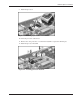
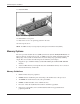
To install DIMMs:
1. Power down the server. Refer to “Powering Down the Server” in Chapter 2, “Server
Operations.”
2. Extend the server from the rack. Refer to “Extending the Server from the Rack” in
Chapter 2, “Server Operations.”
3. Remove the access panel. Refer to “Removing the Access Panel and the Chassis
Stiffener” in Chapter 2, “Server Operations.”