
ProLiant DL145 Server Maintenance and Service Guide



Removal and Replacement Procedures
Front Panel Board
To remove the front panel board:
1. Power down the server. Refer to “Powering Down the Server” ea rlier in this chapter.
2. Extend the server from the rack. Refer to “Extending the Server from the Rack” earlier in
this chapter.
3. Remove the access panel. Refer to “R emoving the Access Panel” earlier in this chapter.
4. Disconnect all cables from the front panel board.
5. Remove the signal interface board. Refer to “Signal Interface Boar d” earlier in this
chapter.
6. Remove the power supply. Refer to “P ower Supply” earlier in this chapter.
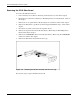
7. Remove the front panel board.
Figure 2-29: Removing the front panel board
Reverse the steps to replace the front panel board.
2-30 HP ProLiant DL145 Server Maintenance and Service Guide