
ProLiant DL145 Server Maintenance and Service Guide







Removal and Replacement Procedures
Processors
The server supports up to two processors.
CAUTION: Processor socket 1 and processor power module (PPM) slot 1 must be populated
at all times or the server will not function properly.
CAUTION: If upgrading processor speed, update the system ROM before installing the
processor.
IMPORTANT: Mixing processor speeds and cache sizes is not supported.
To remove a processor:
1. Power down the server. Refer to “Powering Down the Server” ea rlier in this chapter.
2. Extend the server from the rack. Refer to “Extending the Server from the Rack” earlier in
this chapter.
3. Remove the access panel. Refer to “R emoving the Access Panel” earlier in this chapter.
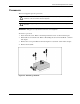
4. Remove the heatsink.
Figure 2-6: Removing a heatsink
HP ProLiant DL145 Server Maintenance and Service Guide 2-9