
ProLiant DL145 Generation 3 Server Maintenance and Service Guide

Removal and replacement procedures 46
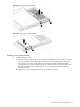
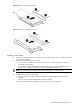
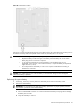
Figure 52 Installing a full-sized riser board
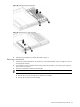
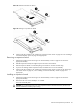
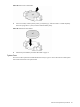
Figure 53 Installing a low-profile riser board
4. Continue with the procedure in the “Installing an expansion board” section on page 46 or the “Installing a
riser board assembly” section on page 43 as appropriate.
Removing an expansion board
1. Perform the procedure in the “Removing a riser board assembly” section on page 42 to remove the
appropriate assembly.
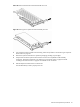
2. Hold the expansion board by the edges and pull it out of the riser board slot.
3. Place the expansion board on a static-dissipating work surface or inside an anti-static bag.
4. If you are not installing another expansion board, reinstall the slot cover on the assembly.
5. Continue with the procedure in the “Installing an expansion board” section on page 46, the “Removing a
riser board” section on page 44, or the “Installing a riser board assembly” section on page 43 as
appropriate.
Installing an expansion board
1. Perform the procedure in the “Removing a riser board assembly” section on page 42 to remove the
appropriate assembly.
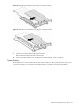
2. Remove the slot cover on the assembly if it is installed.
Store it for reassembly later.
CAUTION: Do not discard the slot cover. If the expansion board is removed in the future, the slot cover
must be reinstalled to maintain proper cooling.