
ProLiant DL145 Generation 3 Server Maintenance and Service Guide

Removal and replacement procedures 40
The DIMM slots are designed to ensure proper installation. If you insert a memory module but it does
not fit easily into the slot, you may have inserted it incorrectly. Reverse the orientation of the module
and insert it again.
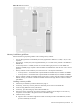
b. Firmly press the holding clips inward to secure the memory module in place.
If the holding clips do not close, the module is not inserted correctly.
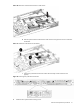
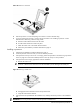
Figure 43 Installing a memory module
7. Perform the post-installation procedures described on page 12.
Removing a memory module
1. Perform the pre-installation procedures described on page 11.
2. If necessary, remove any accessory boards or cables that prevent access to the DIMM slots.
3. Locate the memory module you want to remove.
4. Remove the selected memory module:
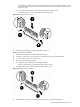
a. Completely open the holding clips securing the module.
This forces the module up in the slot and makes it easier to remove.
b. Gently pull the memory module upward to remove it from its slot.
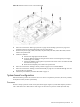
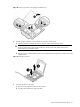
Figure 44 Removing a memory module
5. Place the memory module on a static-dissipating work surface or inside an anti-static bag.