
ProLiant DL145 Generation 3 Server Maintenance and Service Guide

Removal and replacement procedures 33
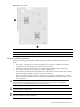
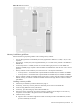
Figure 34 Processor sockets
Item Component Code Component
1 U42 AMD Opteron 1207-pin processor 1 socket
2 U55 AMD Opteron 1207-pin processor 2 socket
Processor installation guidelines
Observe the following important guidelines before performing any of the installation steps listed in the next
section:
• The processor 1 socket (U42) must always be populated. If no processor is installed in this socket, the
system fails to boot, halts during POST, and does not function properly.
• Handle the processor and heat sink with care. Damage to either may affect processor performance.
• The processor socket pins are very fragile. Do not bend or damage them.
• Be sure that the server has the most recent ROM version. If the ROM is not the most recent version, failure to
flash the ROM before installing a processor can cause a system failure.
• HP does not recommend using a processor in the processor 2 socket (U55) when all processor 2 socket
DIMM slots (DIMM5 to DIMM8) are empty. Populate at least the DIMM7 and DIMM8 slots when you install
a second processor.
CAUTION: To prevent the heat sink from tilting to one side during installation or removal procedures, HP
recommends that you alternate tightening or loosening each screw a little at a time. Do not tighten or
loosen one screw completely before tightening or loosening the other.
CAUTION: To help avoid damage to the processor and system board, do not install the processor without
using the processor installation tool.
NOTE: The heat sink may differ slightly in appearance from the design shown in this document. This does not
affect the installation or removal procedures.