
ProLiant DL145 Generation 3 Server Maintenance and Service Guide

Removal and replacement procedures 16
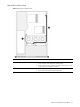
Hard drive cable routing
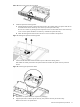
Non-hot-plug SATA hard drive cable routing
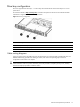
Figure 7 Non-hot-plug SATA hard drive cable routing
Item Description Connections
1 Drive power cable • P41 on the system board
• Power connector on each installed non-hot-plug SATA hard drive
• Power connector on the optical drive docking board, if installed
2 SATA data cables • P19 or P23 on the system board
• Data connector on each installed non-hot-plug SATA hard drive
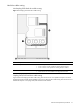
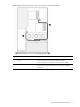
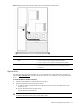
Hot-plug SATA/SAS hard drive cable routing
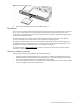
Figure 8 shows the hot-plug hard drive cable routing when the server has a low-profile PCI Express x4 or PCI-X
hot-plug SATA/SAS controller board installed. Figure 9 shows the hard drive cable routing when the server has a
full-sized PCI Express x16 hot-plug SATA/SAS controller board installed.