
Important Information HP Smart Array P-Series Battery Pack Installation for the HP Smart Array E500 Controller in HP ProLiant DL140 and DL145 Generation 3 Servers
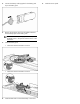

5. Connect the battery cable (supplied in the battery pack
kit) to the battery pack.
6. Remove the protective strip from the adhesive-backed
hook-and-loop tape on the battery pack.
IMPORTANT: To maintain proper clearances, install
the battery pack in the specific location shown in the
illustration.
7. Install the battery pack:
o HP ProLiant DL140 Generation 3 Server
o HP ProLiant DL145 Generation 3 Server
8. Install the HBA and riser board assembly in the server.
9. Install the access panel.