
HP ProLiant DL145 Generation 3 Server Software Configuration Guide


System BIOS configuration 9
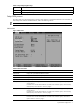
Table 3 Primary Master/Primary Slave submenus fields
Field Description Options
Transfer Mode Selects the method for transferring the data between the related device and
the system memory.
Setup only lists the options supported by the drive and platform.
Standard
Fast PIO 1
Fast PIO 2
Fast PIO 3
Fast PIO 4
FPIO 3/DMA 1
FPIO 4/DMA 2
Ultra DMA Mode Enables the related device to employ an Ultra Direct Memory Access (UDMA)
mode in transferring data.
If enabled, Setup displays the UDMA mode used by the device.
Disabled
Mode 0
Mode 1
Mode 2
Mode 3
Mode 4
Mode 5
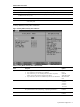
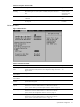
Boot Options submenu
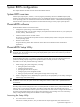
Figure 4 Boot Options submenu
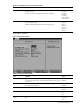
Table 4 Boot Options submenu fields
Field Description Options
Boot Summary Screen Enables the boot-time diagnostic screen.
For more details on this screen, see the “Boot-time diagnostic screen” section
on page 24.
Disabled
Enabled
QuickBoot Mode Enables the system to skip certain POST items during bootup, decreasing the
time needed to boot the system.
Disabled
Enabled
Boot Diagnostic Screen Displays the diagnostic screen during bootup. Disabled
Enabled
NumLock Selects the NumLock state during bootup. Auto
On
Off
Extended Memory
Testing
Selects the scope of testing done during extended memory testing (above 1
MB).
Normal
Just zero it
None